
Last reviewed August 2026
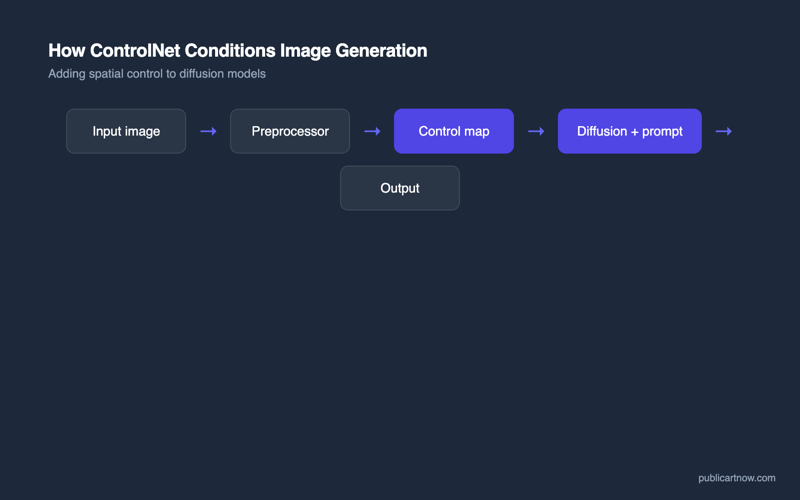
ControlNet is a neural network architecture that adds spatial conditioning to AI image diffusion models. It accepts reference inputs — edge maps, depth maps, pose skeletons, scribbles — and constrains the generated image to follow that spatial structure. It turned AI generation from random output into a precision tool where composition, pose, and layout are controllable.
What does ControlNet actually do?
ControlNet locks the spatial structure of an AI-generated image to a reference input. Without it, text-to-image models produce compositions unpredictably — the same prompt generates wildly different layouts each time. ControlNet adds a conditioning layer that says “put the subject here, at this angle, with this depth relationship” while the base model handles textures, lighting, and style.
Published by Lvmin Zhang and Maneesh Agrawala at Stanford in February 2023, ControlNet works by creating a trainable copy of the encoding layers of a diffusion model. This copy processes the spatial condition (an edge map, a depth map, a skeleton) and injects its output into the frozen base model through zero-convolution layers. The base model’s weights stay untouched — ControlNet adds control without breaking existing capabilities.
According to the original paper, the architecture achieves this without any additional training of the base model, making it compatible with any Stable Diffusion checkpoint, including community fine-tunes and LoRA models on platforms like CivitAI.
What are the main ControlNet preprocessors?
Each preprocessor extracts a different type of spatial information from a reference image. The preprocessor output becomes the conditioning signal — the constraint the generated image must follow. Choosing the right preprocessor determines how tightly controlled the output is and which aspects of the reference carry through.
| Preprocessor | What it extracts | Best use case | Precision level |
|---|---|---|---|
| Canny Edge | Hard edges and outlines | Sketches, line art, architectural drawings | Very high — exact edge placement |
| Depth (MiDaS / Zoe) | Distance from camera per pixel | Scene composition, maintaining spatial relationships | High — relative depth preserved |
| OpenPose | Human body joint positions | Matching specific poses, action shots | Moderate — pose accurate, details free |
| Scribble | Rough hand-drawn outlines | Quick concept sketches, loose composition | Low — general shape only |
| Lineart | Clean line drawing conversion | Colouring existing illustrations, manga | High — line placement exact |
| Tile | Image regions at upscale resolution | Upscaling, adding detail to low-res images | High — structural match per tile |
| Normal Map | Surface orientation per pixel | 3D-to-2D rendering consistency | Very high — surface geometry locked |
| Segmentation | Semantic region labels | Controlling where objects appear | Moderate — regions correct, details free |
ControlNet turned AI image generation from a slot machine into a precision instrument. Canny edge detection specifically is the single most useful preprocessor for anyone who draws — a pencil sketch becomes a spatial constraint that the model fills with photorealistic or stylised detail, preserving exact composition.
Why did ControlNet solve the precision problem?
Before ControlNet, professional designers could not use AI generation reliably. A prompt like “modern house with large windows facing a garden” might produce the house on the left, the right, seen from above, or from the side. Generating one specific composition required dozens of attempts and careful seed manipulation. The output was creative but uncontrollable.
ControlNet eliminated this randomness for spatial layout. A designer feeds in a rough depth map or edge sketch, and every generation respects that structure. The base model still varies textures, lighting, and fine details — providing creative variation — but the bones of the image are locked. This is the difference between a free AI image tool that produces surprises and one that executes intent.
Architecture firms were among the earliest adopters. According to workflow documentation on the ComfyUI repository, ControlNet depth conditioning from 3D model renders became a standard technique for concept visualisation by mid-2024.
How do you use ControlNet in practice?
The practical workflow involves three steps: prepare a reference, choose a preprocessor, and generate with a text prompt plus the spatial condition. In ComfyUI, this means connecting a ControlNet Apply node between your image loader and the KSampler. In Automatic1111, it is a collapsible panel below the main prompt area.
A typical architecture workflow: render a 3D model from the desired angle in Blender or SketchUp, run the depth preprocessor on that render, then generate with ControlNet Depth conditioning and a prompt describing materials and lighting. The output matches the 3D model’s spatial structure exactly while the diffusion model adds photorealistic surface detail.
Multiple ControlNet units can stack. Combining Depth (for spatial layout) with Canny (for edge detail) produces outputs that respect both the scene’s geometry and its fine structural lines. According to Stable Diffusion Art’s guides, stacking two units at 0.5-0.7 strength each typically produces better results than one unit at full strength.
Which ControlNet models work with which base models?
ControlNet models are architecture-specific. A ControlNet trained for SD 1.5 does not work with SDXL, and neither works with FLUX. Each major model family requires its own ControlNet weights. As of mid-2026, the ecosystem status is:
- SD 1.5: Full set of 14+ preprocessors, mature and stable. The most complete ControlNet ecosystem.
- SDXL: Most preprocessors available. Quality improvements over SD 1.5 versions but some edge cases remain.
- FLUX.1: ControlNet support arriving via community releases on Hugging Face. Depth and Canny available; full parity with SD 1.5 ecosystem not yet reached.
The SD 1.5 ControlNet ecosystem remains the most complete and battle-tested. For workflows where spatial precision matters more than base image quality, SD 1.5 plus ControlNet can outperform FLUX without conditioning — because controlled mediocrity beats uncontrolled excellence in production work.
For related reading, see making AI animations from stills and creating consistent AI characters.
Does ControlNet work with any Stable Diffusion model?
ControlNet weights are version-specific. You need ControlNet models trained for the same architecture as your base model — SD 1.5 ControlNets for SD 1.5 checkpoints, SDXL ControlNets for SDXL checkpoints. Mismatched versions produce corrupted output or errors.
How much VRAM does ControlNet require?
Each ControlNet unit adds approximately 1.5-2 GB of VRAM usage on top of the base model. Running SD 1.5 plus one ControlNet requires about 6 GB; SDXL plus one ControlNet requires about 10 GB. Stacking multiple units multiplies the addition.
Can ControlNet preserve exact colours from a reference?
Standard preprocessors extract structure, not colour. The Reference-only ControlNet model and IP-Adapter are designed specifically for style and colour transfer. For exact colour matching, IP-Adapter with a high weight (0.8+) provides the closest results.
Is ControlNet available in Midjourney or DALL-E?
Neither Midjourney nor DALL-E offers ControlNet or equivalent spatial conditioning as of August 2026. Midjourney has image prompting and style references, but no edge, depth, or pose conditioning. This remains the primary functional advantage of open-source tools.