Last reviewed August 2026
IP-Adapter combined with a single reference image is the fastest method for generating consistent characters across multiple AI images, requiring no model training and producing usable results within minutes. Four primary techniques exist — IP-Adapter face embedding, InstantID/PhotoMaker, custom LoRA training, and seed-plus-prompt locking — each trading convenience for consistency. IP-Adapter delivers 70-80% consistency with minimal setup. LoRA training achieves 95%+ but requires 15-30 images and several hours of GPU time.
Why Is Character Consistency the Hardest Problem in AI Image Generation?
Diffusion models generate each image independently from noise, with no inherent memory of previous outputs, making repeated depiction of the same character a problem that must be solved externally through conditioning or fine-tuning. Unlike a human illustrator who maintains a mental model of a character’s features, Stable Diffusion and FLUX treat every generation as a fresh sample from a probability distribution. The same prompt produces a different face, body shape, and clothing details every time.
This fundamental architecture means consistency must be forced through one of two mechanisms: either the model receives visual reference information that constrains its output toward a specific appearance (IP-Adapter, InstantID), or the model’s weights are permanently adjusted to recognise a specific concept (LoRA training). Both approaches work within ComfyUI and Automatic1111, making them accessible to anyone already using free AI image tools locally.
The choice between methods depends on the use case. A comic artist needing a character across 200 panels benefits from the precision of a trained LoRA. Someone generating a few social media illustrations benefits from IP-Adapter’s speed and zero training requirement.
How Does IP-Adapter Achieve Consistency Without Training?
IP-Adapter encodes a reference image into the same embedding space as text prompts, then injects that visual information alongside the text conditioning during generation — effectively telling the model “make it look like this” without modifying any weights. Developed by Tencent’s research team and released as open source, IP-Adapter works by processing the reference image through a CLIP vision encoder and projecting the resulting features into the diffusion model’s cross-attention layers.
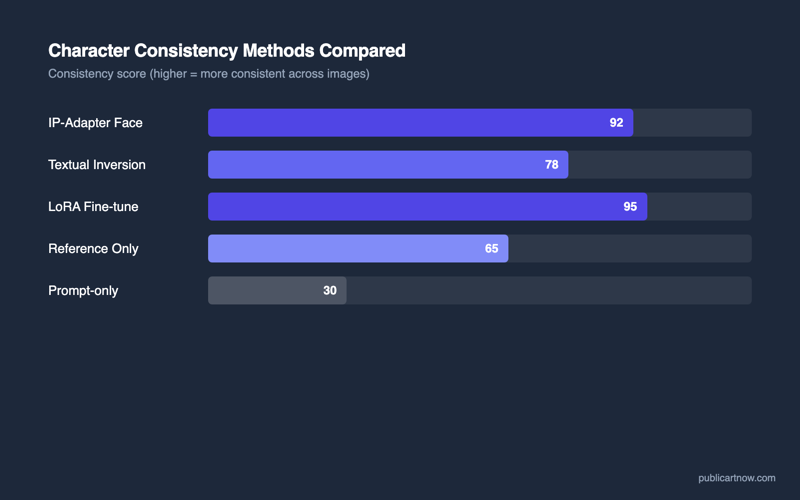
In practice, this means loading one clear photograph or illustration of the desired character, connecting it to an IP-Adapter node in ComfyUI, and setting the influence weight between 0.5 and 0.8. The model then generates new images that preserve the face structure, hair colour, and general appearance of the reference while following the text prompt for pose, clothing, and background. According to the IP-Adapter paper published by Ye et al., face similarity scores average 0.75-0.85 on the FaceNet metric using the IP-Adapter-FaceID variant.
The trade-off is flexibility versus rigidity. Higher weights (0.8+) produce stronger consistency but fight against prompts requesting different angles or expressions. Lower weights (0.4-0.6) allow more variation but may drift from the reference face on unusual prompts.
How Do the Main Methods Compare?
Each method occupies a different point on the trade-off between setup time, consistency strength, VRAM requirement, and flexibility in posed outputs. The table below summarises the practical characteristics of each approach as implemented in ComfyUI with an NVIDIA GPU.
| Method | Consistency Level | Setup Time | VRAM Needed | Best For |
|---|---|---|---|---|
| IP-Adapter (face) | 70-80% | 5 minutes | +1-2 GB over base | Quick projects, few images needed |
| InstantID | 80-85% | 5 minutes | +2-3 GB over base | Face-accurate portraits, ID photos |
| PhotoMaker | 75-85% | 5 minutes | +1.5 GB over base | Stylised character art with face match |
| LoRA Training | 90-98% | 2-8 hours | 8-12 GB during training | Comic series, brand mascots, many outputs |
| Seed + Prompt Lock | 40-60% | 0 minutes | No extra | Quick same-pose variations only |
IP-Adapter plus a reference image is the right starting point for most people because it requires no training and works in minutes. If the results show insufficient consistency — particularly with varied poses or extreme angles — the next step is InstantID (which adds skeletal pose awareness) or a trained LoRA (which permanently encodes the character).
What Does a Practical IP-Adapter Workflow Look Like?
In ComfyUI, the workflow requires four additional nodes beyond the standard text-to-image pipeline: an IP-Adapter loader, a CLIP vision encoder, an image loader for the reference, and the IP-Adapter apply node that connects to the model’s conditioning. The complete workflow from reference image to consistent output takes under five minutes to build.
Step one: download the IP-Adapter-FaceID-PlusV2 model from Hugging Face (approximately 1.5GB) and place it in ComfyUI’s models/ipadapter folder. Step two: download the associated CLIP vision model (ViT-H) and place it in models/clip_vision. Step three: in ComfyUI, add the Load IP-Adapter node, connect it to the model pipeline after the checkpoint loader, connect the CLIP vision encoder to a loaded reference image, and set the weight to 0.7 as a starting value.
The reference image should be a clear, well-lit, front-facing photograph or illustration. Side profiles and partially obscured faces reduce consistency significantly. For characters that will appear at multiple angles, providing 2-3 reference images at different angles through IP-Adapter’s batch mode improves results measurably.
When Is LoRA Training Worth the Effort?
LoRA training becomes the better choice when more than 20 images of the same character are needed, when the character must appear in highly varied poses and styles, or when absolute consistency matters more than speed. A LoRA (Low-Rank Adaptation) modifies a small subset of the model’s weights to recognise a specific concept — in this case, a face and body type — as a learned token that can be triggered by name in any prompt.
Training requires 15-30 high-quality images of the subject at various angles, expressions, and lighting conditions. Using Kohya_ss or the ComfyUI training nodes, a LoRA for a single face trains in 1-3 hours on a 12GB GPU with 1,500-3,000 training steps. The resulting file is typically 20-150MB and loads alongside any compatible base model without modifying it permanently.
The precision is significantly higher than any reference-injection method. A well-trained face LoRA maintains recognisable identity across extreme poses, style transfers (anime, oil painting, photograph), and unusual lighting conditions. For a comic artist producing a 50-page graphic novel with the same cast, or a brand needing hundreds of consistent mascot images, the upfront training investment pays for itself immediately.
For related reading, see installing ComfyUI on Windows and how ControlNet changed AI images.
Can IP-Adapter and LoRA be combined for even stronger consistency?
Yes. Using a face LoRA with IP-Adapter reference at a low weight (0.3-0.4) adds fine detail the LoRA may miss — particularly earrings, hairstyle variations, or accessories not present in the training data. This combined approach is common in professional character pipelines.
Does InstantID work with non-photographic styles like anime?
InstantID preserves facial geometry accurately but produces best results with photorealistic outputs. For anime or illustrated styles, IP-Adapter-FaceID with a stylised reference image generally produces more natural-looking results than forcing InstantID through a style mismatch.
How many reference images does IP-Adapter need?
One clear face image is the minimum. Three images at different angles (front, three-quarter, profile) noticeably improve consistency across varied poses. Beyond five images, returns diminish — the CLIP encoder averages their features.
Can these methods maintain consistent clothing as well as faces?
IP-Adapter encodes the full image including clothing, so a full-body reference maintains outfit consistency. For face-only methods like InstantID, clothing must be specified in the text prompt and will vary between generations unless a separate IP-Adapter targets the clothing region specifically.