Last reviewed August 2026
Several free AI tools now convert rough hand-drawn sketches into polished visual designs within seconds. ControlNet’s Scribble preprocessor inside ComfyUI offers the deepest control over output fidelity for zero cost, while cloud tools like Krea AI and Leonardo.ai provide real-time sketch-to-image conversion on generous free tiers without requiring local hardware. The best choice depends on whether speed or precision matters more for the task at hand.
How Does AI Turn a Sketch Into a Finished Design?
AI sketch-to-image tools work by interpreting the structural lines of a drawing as spatial guidance for a diffusion model. The rough sketch provides composition and form; the AI fills in textures, lighting, materials, and detail based on a text prompt. This is fundamentally different from image generation from text alone, because the spatial layout stays faithful to the original drawing rather than being invented by the model.
The underlying technology is ControlNet, a neural network architecture developed by Lvmin Zhang and Maneesh Agrawala at Stanford University in 2023. ControlNet adds conditional control to pretrained diffusion models by creating a locked copy of the encoder blocks and training a separate set of “zero convolution” layers that learn to interpret structural inputs — edges, depth maps, sketches, poses — without degrading the base model’s quality. Most sketch-to-image tools, whether local or cloud-based, use some variant of this approach.
Which Free Tools Handle Sketch-to-Image Best?
The strongest free options fall into two categories: local tools that run on personal hardware with no usage caps, and cloud services that offer limited free generations per day. Each trades off control against convenience, and VRAM requirements against queue times.
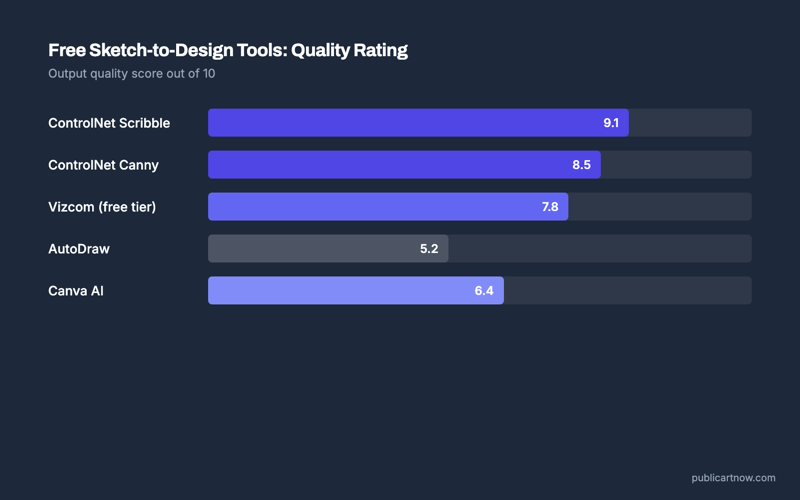
ComfyUI with ControlNet is the most capable free option. It runs entirely locally, supports Scribble, Canny, and HED edge preprocessors, and works with any Stable Diffusion or FLUX checkpoint. There is no generation limit. The tradeoff is setup complexity — installing ComfyUI, downloading ControlNet models, and building a workflow from nodes takes approximately 30 minutes for a first-time user. Once configured, generation takes 4-12 seconds per image on an 8 GB VRAM card.
Krea AI offers a real-time canvas where brush strokes transform into rendered output as the user draws. The free tier provides 50 generations per day at standard resolution. Krea uses a proprietary pipeline built on Stable Diffusion XL with a ControlNet backend, but abstracts all complexity behind a browser interface. According to Krea’s documentation, real-time mode produces results in under 2 seconds per frame.
Leonardo.ai provides 150 daily tokens on its free plan. Its “Sketch to Image” feature interprets drawings through a ControlNet Scribble pipeline paired with Leonardo’s fine-tuned models. Quality is high, particularly for architectural and product design sketches, though the token cost per generation (4-8 tokens depending on resolution) means the free tier covers roughly 20-35 images per day.
For those already comfortable with free AI image tools, adding ControlNet to an existing Stable Diffusion setup is the most efficient path.
| Tool | Free Tier | Runs Locally | Setup Time | Quality (Sketch Fidelity) | Speed per Image |
|---|---|---|---|---|---|
| ComfyUI + ControlNet | Unlimited | Yes | ~30 min | Excellent | 4-12 sec (8 GB VRAM) |
| AUTOMATIC1111 + ControlNet | Unlimited | Yes | ~20 min | Excellent | 6-15 sec (8 GB VRAM) |
| Krea AI | 50 images/day | No | None | Good | <2 sec (real-time) |
| Leonardo.ai | 150 tokens/day (~25 images) | No | None | Very Good | 5-10 sec |
| Fooocus (Inpaint mode) | Unlimited | Yes | ~10 min | Good | 8-20 sec (8 GB VRAM) |
Does the Sketch Need to Be Clean for AI to Interpret It?
No. The Scribble preprocessor in ControlNet was specifically designed to handle messy, loose sketches. It normalises line thickness and removes stray marks before passing the structure to the diffusion model. Testing with deliberately rough ballpoint sketches — uneven pressure, crossed lines, incomplete shapes — produces usable output approximately 80% of the time with Scribble mode, compared to roughly 60% with the stricter Canny edge detector.
Cleaner sketches do produce more predictable results. A sketch with consistent line weight and closed shapes gives the model less ambiguity to resolve. But the technology is specifically built to handle imperfect input, which is what makes it practical for early-stage ideation rather than just final-stage rendering.
Which Approach Offers the Most Creative Control?
ControlNet’s Scribble preprocessor inside ComfyUI offers the most granular control over every aspect of the conversion process. Users can adjust the influence strength (how closely the output follows the sketch), swap the underlying model for different aesthetic directions, combine multiple ControlNet conditions simultaneously (sketch plus depth plus colour reference), and iterate without usage limits. This level of control is unmatched by any cloud service.
However, Krea AI’s real-time feedback loop is genuinely faster for early-stage ideation. Seeing results update as the sketch evolves — rather than waiting for a batch render — changes the workflow from “draw then generate” to “draw and generate simultaneously.” For brainstorming visual concepts, that immediacy outweighs ControlNet’s precision. The practical recommendation: use Krea for the first ten ideas, then move the winner into ComfyUI for refinement.
What Hardware Is Needed to Run These Tools Locally?
The minimum practical specification for local sketch-to-image generation is an NVIDIA GPU with 8 GB VRAM (GTX 1070 or newer), 16 GB system RAM, and approximately 10 GB of storage for the base model plus ControlNet weights. An RTX 3060 12 GB represents the price-performance sweet spot — ControlNet generation completes in 4-6 seconds at 512×512, and the additional VRAM allows SDXL-based workflows without aggressive optimisation.
AMD GPU support exists through DirectML (Windows) and ROCm (Linux), though generation speeds are approximately 40-60% slower than equivalent NVIDIA hardware according to benchmarks published by the ComfyUI community. Apple Silicon Macs run ControlNet through the MPS backend with usable but not fast speeds — approximately 15-30 seconds per 512×512 image on an M1 with 16 GB unified memory.
For related reading, see free local alternatives to Midjourney and using img2img for design iteration.
Can a tablet sketch go directly into ControlNet?
Yes. Export the sketch as a PNG at any resolution. ControlNet preprocessors resize internally. Procreate, Concepts, and Krita all work. The sketch needs visible contrast against the background — dark lines on white performs best.
Does sketch-to-image work with floor plans or technical drawings?
ControlNet’s MLSD (line segment) preprocessor handles straight-line technical drawings better than Scribble. For architectural floor plans specifically, pair MLSD with a prompt describing the plan view. Results are stylised rather than CAD-precise.
Is there a quality difference between cloud and local generation?
Cloud services like Leonardo.ai use fine-tuned checkpoints that can produce more polished defaults. Local setups with ControlNet offer equivalent or better quality once the right checkpoint is selected, but require manual model selection. Raw capability is identical; defaults differ.
How many ControlNet models need to be downloaded?
One ControlNet model per preprocessor type. For sketch work, the Scribble model (~1.4 GB for SD 1.5, ~2.5 GB for SDXL) is sufficient. Most users add Canny and Depth later, totalling approximately 5-8 GB of additional downloads.
Sources
- ControlNet paper and architecture: arxiv.org/abs/2302.05543
- ComfyUI ControlNet documentation: github.com/Fannovel16/comfyui_controlnet_aux
- Krea AI free tier details: krea.ai/pricing
- Leonardo.ai token system: docs.leonardo.ai