Last reviewed August 2026
The best free alternatives to Midjourney that run entirely on local hardware are Fooocus, ComfyUI with FLUX, and Stable Diffusion through AUTOMATIC1111 or Forge. Fooocus replicates Midjourney’s one-prompt simplicity with zero configuration. ComfyUI paired with FLUX.1 Dev produces output that matches or exceeds Midjourney v6 quality, though it requires a more powerful GPU and a steeper initial setup. All three are completely free, require no subscription, and work offline.
What Does Running AI Image Generation Locally Actually Mean?
Local generation means the AI model runs on the user’s own hardware — their GPU processes the computation, the model weights sit on their storage, and no data leaves the machine. This stands in contrast to cloud services like Midjourney, DALL-E, and Adobe Firefly, where prompts are sent to remote servers for processing. The practical implications are significant: no monthly subscription, no content filters imposed by a platform, no generation limits, no internet connection required after setup, and complete privacy over prompts and outputs.
The tradeoff is hardware cost. Effective local generation requires an NVIDIA GPU with at least 8 GB VRAM, and the best results come from 12 GB or more. A used RTX 3060 12 GB — the entry point for comfortable local generation — costs approximately £200-250 on the secondhand market. That is roughly equivalent to 20 months of Midjourney’s Basic plan, after which the local setup continues producing unlimited images at zero marginal cost.
How Does Fooocus Compare to Midjourney?
Fooocus, created by developer Lvmin Zhang (also behind ControlNet), is explicitly designed as a local Midjourney alternative. It presents a single text prompt box with optional style presets — no nodes, no parameters, no configuration. According to its documentation, Fooocus achieves results comparable to Midjourney v5 quality with a default setup, improving further with SDXL refinement models enabled. Installation takes under 10 minutes via a one-click installer on Windows or a single git clone on Linux.
The software uses Stable Diffusion XL as its base, with built-in prompt expansion (automatically enriching short prompts with quality-improving tokens), a negative prompt preset, and a multi-step refinement pass. The result is that a prompt like “mountain landscape at sunset” produces a polished, atmospheric image without the user needing to add “8k, detailed, professional photography” or similar quality modifiers that other interfaces require.
Where Fooocus falls short of Midjourney is coherence on complex multi-subject scenes and text rendering within images. Midjourney v6’s architecture handles “a red car parked next to a blue bicycle in front of a yellow house” more reliably than SDXL-based pipelines. For single-subject prompts and landscape/abstract work, the gap is negligible.
What About ComfyUI With FLUX — Is It Really Better?
FLUX.1, released by Black Forest Labs (the team behind Stable Diffusion), represents the current state of the art in open-source image generation. The FLUX.1 Dev model — free for non-commercial use — produces images that rival the best commercial generators in prompt adherence, natural lighting, and anatomical accuracy. ComfyUI is the interface most users pair with FLUX, offering a node-based workflow that provides complete control over every generation parameter.
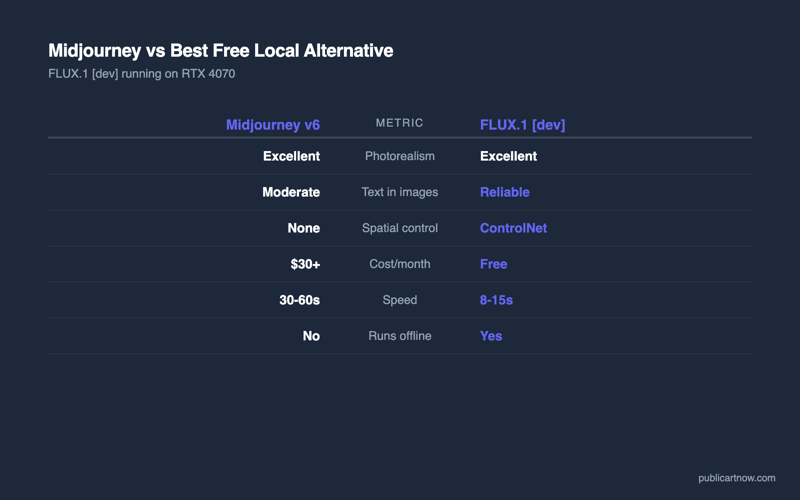
The quality ceiling is higher than Fooocus. FLUX handles complex compositions, accurate text rendering, and photorealistic human faces with fewer artifacts than any SDXL-based tool. Independent comparisons published on the Stable Diffusion subreddit consistently rate FLUX.1 Dev output as equivalent to Midjourney v6 for photorealistic prompts and superior for stylised illustration work.
The cost is complexity and hardware. ComfyUI presents a visual programming interface with nodes and connections rather than a simple prompt box. The learning curve takes 2-4 hours to become productive. FLUX.1 Dev’s model weights total approximately 23 GB, and generation requires a minimum of 12 GB VRAM (RTX 3060 12 GB or better). Generation speed on a 12 GB card is approximately 20-40 seconds per image — slower than Midjourney’s 30-60 second cloud render, but fully private and unlimited.
| Tool | Quality vs Midjourney v6 | Min VRAM | Setup Difficulty | Speed (per image) | Best For |
|---|---|---|---|---|---|
| Fooocus | ~90% (single subjects) | 8 GB | Very Easy | 8-15 sec | Quick results, beginners |
| ComfyUI + FLUX.1 Dev | 95-100% | 12 GB | Moderate | 20-40 sec | Maximum quality, full control |
| AUTOMATIC1111 + SDXL | ~85% | 8 GB | Easy | 10-20 sec | Plugin ecosystem, familiar UI |
| Forge + SDXL | ~85% | 6 GB | Easy | 8-15 sec | Low-VRAM systems, speed |
| ComfyUI + SDXL Turbo | ~75% | 8 GB | Moderate | 1-3 sec | Real-time iteration |
Is AUTOMATIC1111 or Forge Still Worth Using?
AUTOMATIC1111’s WebUI remains the most documented and plugin-rich Stable Diffusion interface. Its extension ecosystem includes over 500 community plugins covering inpainting, upscaling, animation, LoRA training, and specialised workflows. For users who want a browser-based interface with a familiar prompt-and-settings layout (closer to how Midjourney works than ComfyUI’s node graph), it remains a strong choice.
Forge is a performance-optimised fork of AUTOMATIC1111, created by the same Lvmin Zhang behind Fooocus and ControlNet. It reduces VRAM usage by approximately 20-30% through aggressive memory management, making it the best option for users with 6-8 GB GPUs. Image quality is identical to AUTOMATIC1111 — only memory efficiency and generation speed differ.
The limitation of both is that they are built primarily around Stable Diffusion 1.5 and SDXL architectures. FLUX support exists but is less mature than in ComfyUI. For users who want the absolute best quality from FLUX.1 Dev, ComfyUI is the more reliable interface.
What About Privacy and Content Restrictions?
Local generation has no content policy, no prompt logging, and no image storage on external servers. Every prompt stays on the local machine. No terms of service govern what can be generated. This matters for commercial work involving sensitive client briefs, for artistic experimentation that cloud services might reject, and for anyone who objects to their creative work being stored on third-party infrastructure.
Midjourney stores all prompts and generated images on its servers indefinitely, grants itself a licence to use generated content for model improvement, and enforces content policies that restrict medical imagery, violence, and political content. These are reasonable policies for a mass-market cloud service, but they represent constraints that local generation simply does not have.
Which Should a Beginner Choose?
Fooocus is the closest to Midjourney’s simplicity and the correct starting point for anyone who wants results without learning a new interface. It installs in one click, generates good images from bare prompts, and teaches nothing about the underlying technology. For users who later want more control, the step from Fooocus to ComfyUI preserves all prompt knowledge while adding node-based precision. That progression — Fooocus for the first month, ComfyUI when the limits become apparent — is the most efficient learning path.
For related reading, see turning sketches into finished designs with AI and open-source rendering versus paid tools.
Can these tools run on a Mac?
Yes. ComfyUI, AUTOMATIC1111, and Fooocus all support Apple Silicon through the MPS backend. Performance is approximately 3-5x slower than an equivalent NVIDIA GPU, but M1 Pro and M2 machines with 16 GB unified memory produce usable results within 30-60 seconds per image.
Are the outputs legal to use commercially?
Stable Diffusion models (1.5, SDXL) use the CreativeML Open RAIL-M licence, which permits commercial use. FLUX.1 Dev uses a non-commercial licence; FLUX.1 Schnell uses Apache 2.0 (fully commercial). Always check the specific model’s licence before selling generated work.
Do local tools get regular updates?
ComfyUI and AUTOMATIC1111 are actively maintained with weekly updates. New models (LoRAs, checkpoints, ControlNet versions) are released daily on CivitAI and Hugging Face. The local ecosystem evolves faster than any single cloud service.
How much storage space is needed?
A minimal setup (one SDXL checkpoint plus essentials) requires about 8 GB. A comfortable setup with FLUX, multiple checkpoints, ControlNet models, and LoRAs typically occupies 50-100 GB. An SSD is strongly recommended — model loading from a hard drive adds 30-60 seconds of startup time.
Sources
- Fooocus repository and documentation: github.com/lllyasviel/Fooocus
- FLUX.1 model card and licence: huggingface.co/black-forest-labs/FLUX.1-dev
- ComfyUI documentation: github.com/comfyanonymous/ComfyUI
- AUTOMATIC1111 WebUI: github.com/AUTOMATIC1111/stable-diffusion-webui
- Forge optimised WebUI: github.com/lllyasviel/stable-diffusion-webui-forge