Memory is the only hard limit on running an AI model locally. A rough rule covers most cases: a quantised model needs about 0.6 GB of memory per billion parameters, plus a few gigabytes for context and the operating system. On that basis 16 GB of RAM comfortably runs an 8-billion-parameter model, and 8 GB does not.
How much RAM do you need for a local AI model?
Enough to hold the model file, the context window and the operating system at once. The model file is the fixed part and the easiest to check, because every distribution publishes its exact size. Everything else is overhead that scales with how long a conversation is allowed to get.
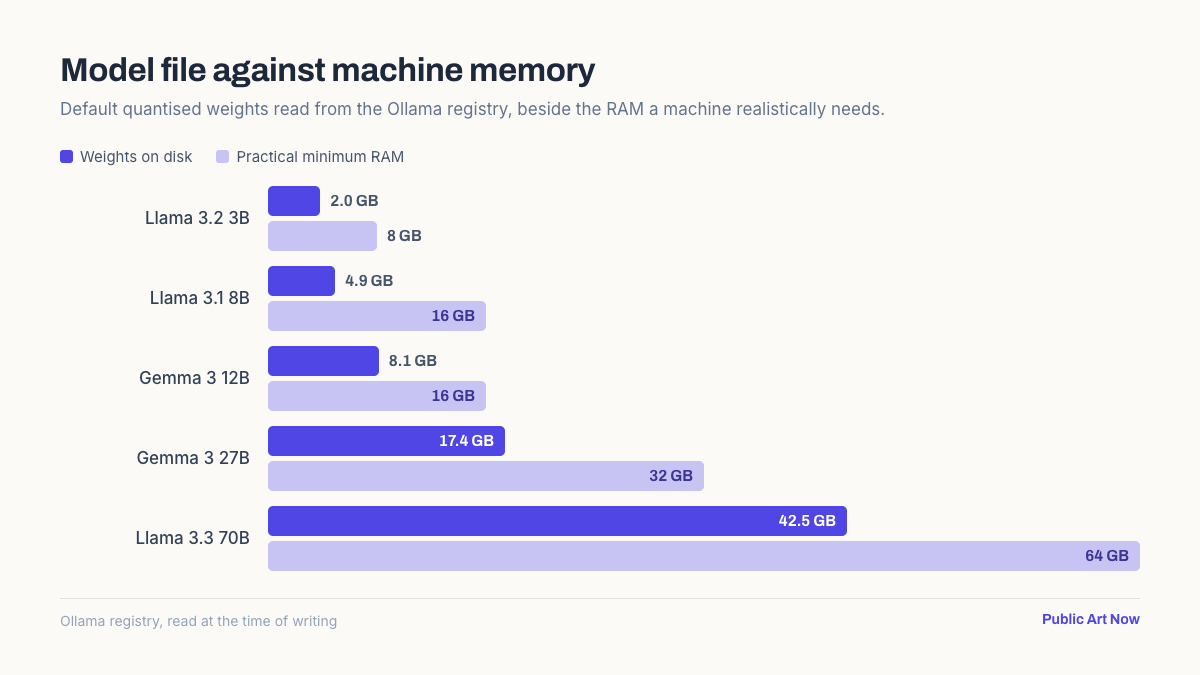
The figures below were read directly from the Ollama model registry at the time of writing, using each model’s default quantisation. They are download sizes, which is also very close to the memory the weights occupy once loaded.
| Model | Weights on disk | Practical minimum RAM |
|---|---|---|
| Llama 3.2 3B | 2.0 GB | 8 GB |
| Gemma 3 4B | 3.3 GB | 8 GB |
| Mistral 7B | 4.4 GB | 16 GB |
| Llama 3.1 8B | 4.9 GB | 16 GB |
| Gemma 3 12B | 8.1 GB | 16 GB |
| Qwen3 14B | 9.3 GB | 24 GB |
| Gemma 3 27B | 17.4 GB | 32 GB |
| Llama 3.3 70B | 42.5 GB | 64 GB |
The pattern is consistent. A model comfortably fits when the machine has roughly three times the weight file in total memory, because the remainder absorbs the context cache and whatever else is running.
Why is the download so much smaller than the parameter count?
Because the weights are quantised. A model trained at 16 bits per parameter would need roughly 2 GB per billion parameters, so an 8B model would be about 16 GB. The versions people actually run store each weight in roughly 4 to 5 bits instead, which is where the 4.9 GB figure for Llama 3.1 8B comes from.
The cost is a small loss of quality. At 4-bit quantisation the degradation is modest for most tasks and severe for none, which is why it has become the default rather than an optimisation.
The llama.cpp project defines the quantisation formats nearly every desktop tool uses, and its own documentation recommends the 4-bit K-quants as the general-purpose choice. Lower quantisation levels exist and are usually a mistake. Below about 4 bits, output quality falls away quickly, and the memory saved is better found by dropping to a smaller model at a sensible quantisation.
A smaller model at 4-bit beats a larger model squeezed to 2-bit, almost every time. Parameter count is not the quality you are buying.
Does it need to be graphics memory?
Not necessarily, but it decides the speed. A model held entirely in a GPU’s video memory generates text several times faster than one running from system RAM on the processor. Anything that does not fit in VRAM is split, and the part running on the CPU sets the pace.
This is where Apple Silicon has an unusual advantage. Its unified memory architecture is shared between processor and graphics, so a Mac with 32 GB can hold a model that would need a 32 GB graphics card on a conventional machine.
On a Windows or Linux desktop the useful figure is VRAM rather than system RAM. A 12 GB graphics card runs an 8B model entirely on the GPU and will be dramatically faster than a machine with 64 GB of system memory and no card worth using.
What does the context window cost?
More than most people expect, and it is the usual cause of a model that loaded fine and then ran out of memory. Every token in the conversation is cached, and that cache grows linearly with the context length while the weights stay fixed.
On a mid-sized model, a long context can add several gigabytes on top of the weights. A machine sized exactly to the model file will load it successfully and then fail partway through a long document. The cache is often called the KV cache, and its size depends on the model’s architecture as well as the length of the conversation, which is why two models of the same parameter count can behave quite differently on the same machine.
Reducing the configured context length is the first thing to try when a model will not stay loaded. It costs nothing and frees memory immediately, which is why the default in most tools is far below the model’s maximum.
What runs on an ordinary laptop?
More than the specifications suggest, provided expectations are set to the right model size. The useful question is not whether a machine can run a large model slowly, but which size gives a usable response speed on the hardware available.
- 8 GB. A 3B or 4B model, short context, nothing else open. Adequate for summarising and rewriting.
- 16 GB. The practical sweet spot. 7B to 12B models run comfortably and handle most everyday tasks.
- 32 GB. Up to about 27B, or a smaller model with a very long context for working over documents.
- 64 GB and above. 70B-class models. Genuinely capable, and slow without a substantial GPU.
The step from 8 GB to 16 GB changes what is possible more than any later upgrade. Below 16 GB the choice of model is constrained; above it, the constraint moves to speed rather than feasibility. The practical setup takes about ten minutes once the size is settled.
The bottom line
Size the machine to the model file, not to the parameter count. About 0.6 GB per billion parameters at the usual 4-bit quantisation, then roughly triple it for headroom, gives a figure that holds across every model in the table above.
Running the model on your own machine also removes the per-query cost and the data transfer entirely, though it does not remove the licence questions attached to whatever it produces. 16 GB is the point at which local models stop being a demonstration and start being useful. Beyond that, a graphics card with enough video memory buys speed, and more system RAM buys context rather than capability.
Frequently asked questions
How much RAM is needed for a local LLM?
Roughly 0.6 GB per billion parameters at 4-bit quantisation, plus headroom for context and the operating system. In practice 8 GB runs 3B to 4B models, 16 GB runs 7B to 12B, and 32 GB reaches about 27B.
Can an 8 GB laptop run an AI model?
Yes, at 3B or 4B. Llama 3.2 3B is a 2.0 GB download and Gemma 3 4B is 3.3 GB, both of which fit with a short context. Larger models will load and then run unusably slowly.
Is VRAM more important than system RAM?
For speed, yes. A model held entirely in graphics memory generates text several times faster than one running on the processor. System RAM determines whether a model runs at all; VRAM determines whether it runs quickly.
Why did my model run out of memory mid-conversation?
The context cache grows with every token while the weights stay fixed. A machine sized exactly to the model file will load it and then fail on a long document. Reducing the configured context length usually fixes it.
Does more aggressive quantisation help?
Rarely. Below about 4 bits per weight, output quality degrades quickly. A smaller model at 4-bit almost always outperforms a larger one squeezed further, so dropping a size class beats dropping a quantisation level.