The small sparkle button showed up in almost every application within about a year. Notes apps, spreadsheets, email clients, project trackers, banking apps. It looks like a design trend, and it is not. Three separate costs collapsed at roughly the same time: the price of running a model, the cost of wiring one into an existing product, and the engineering time needed to keep it working. The button is what that collapse looks like from the outside.
Why did the AI button appear in everything at once?
Because the economics changed faster than the products did. Adding a chat assistant used to mean a machine-learning team, a model to fine-tune, and infrastructure to serve it. It now means an API key and a few hundred lines of code. When the barrier drops that far, the feature stops being a strategic bet and becomes a checkbox, and checkboxes propagate quickly.
The simultaneity is the giveaway. Genuine feature races stagger, because one company ships, others notice, and copies arrive months later. This did not stagger. It arrived in waves across unrelated categories, which is the signature of a shared input becoming cheap rather than of companies copying each other.
How much does an AI feature actually cost to run?
Far less than most people assume, provided the product uses a small model. Anthropic’s published pricing documentation lists Claude Haiku 4.5 at $1 per million input tokens and $5 per million output tokens, and works through an example putting roughly 10,000 customer support conversations at about $37 in total. That is the whole economic argument for the button in one figure.
The top of the range moved too. The same page shows the retired Claude Opus 4.1 at $15 per million input tokens and $75 per million output, against $5 and $25 for the current Opus 5. A flagship tier costing a third of its predecessor changes which features survive a finance review.
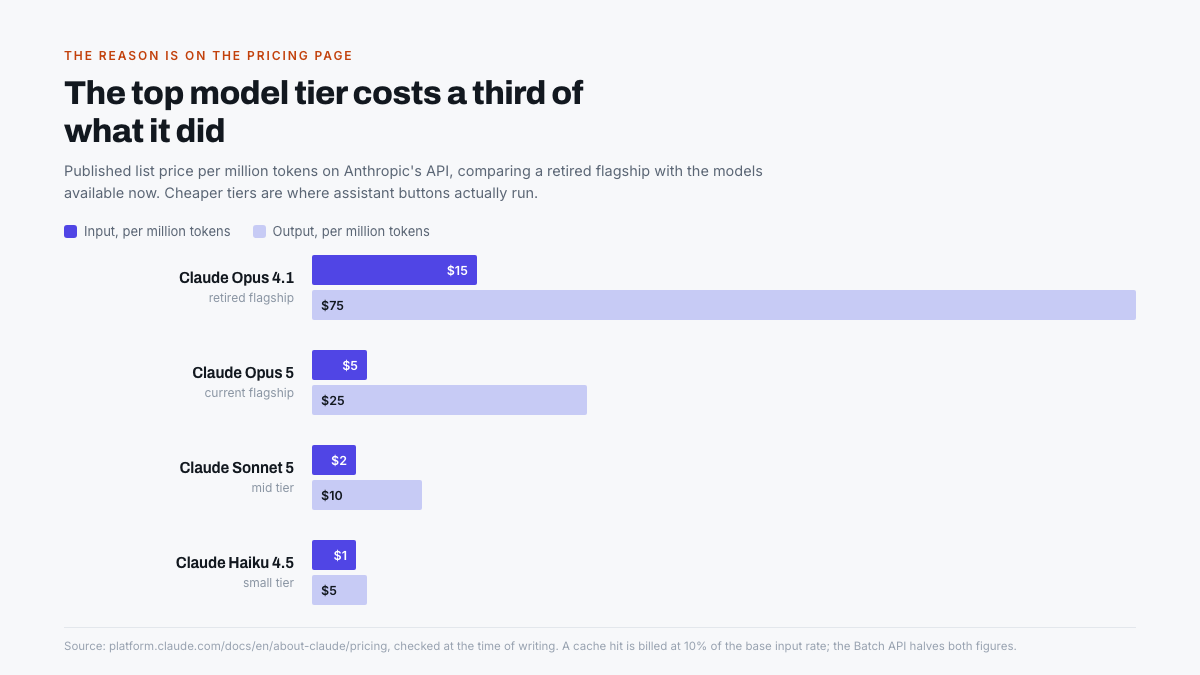
Two further mechanisms cut the bill again. Prompt caching bills a repeated prefix at 10 per cent of the base input rate, which matters enormously for an assistant that sends the same long system prompt on every request. Batch processing halves both input and output rates for anything that does not need an immediate answer.
A feature that costs $37 to serve ten thousand times is not a feature any more. It is a line item nobody argues about.
What made the plumbing easy?
Standardisation. The hard part of an in-app assistant was never the conversation, it was connecting the model to the application’s own data and actions. Every company solved that privately, and every solution broke differently.
The Model Context Protocol turned that into a public standard. Its own documentation describes it as an open-source standard for connecting AI applications to external systems, and compares it to a USB-C port for AI: one connector, many devices. Support now spans Claude, ChatGPT, Visual Studio Code and Cursor, which means an integration written once works across clients instead of being rebuilt per vendor.
That is the unglamorous half of the story and probably the more important one. Cheap inference makes a feature affordable. A shared connector makes it buildable by a team that has no machine-learning specialists at all.
What is the button actually for?
Rarely for the thing it advertises. In most products the assistant serves three commercial purposes before it serves a user need, and reading it that way explains a lot of otherwise puzzling design.
- Price anchoring. An AI tier justifies a higher subscription band without rebuilding the product. The button exists so there is something to put in the upgrade column.
- Retention. A user who has trained an assistant on their own documents has made the product harder to leave. That switching cost is the point.
- Signalling. Investors and procurement teams both look for it. Absence reads as neglect, whether or not the feature is used.
- Data. Assistant prompts reveal what people actually want the product to do, in their own words. That is roadmap research nobody had to commission.
None of these are sinister, but they do explain why so many assistants are prominent and shallow. A button that exists mainly to anchor a price does not need to be good, it needs to be visible.
How to tell a useful assistant from a bolted-on one
The distinction is not subtle once you know what to look for. A genuine integration has access to the application’s data and can act on it. A decorative one is a chat window that happens to be inside your software.
| Signal | Bolted on | Actually integrated |
|---|---|---|
| Knows your data | Asks you to paste it in | Reads the document or record you are looking at |
| Can act | Suggests what you should click | Performs the change, and it is undoable |
| Placement | Floating button on every screen | Appears where the relevant task lives |
| Failure behaviour | Confident answer, no sources | Cites the record it used, or declines |
The undo test is the most reliable of the four. An assistant permitted to change real data in a product that takes its own reliability seriously will always be paired with a way to reverse the change. Where there is no undo, the vendor does not trust the feature either.
What happens next
The button itself is a transitional form. It exists because assistants were added to products that were already finished, so the only place to put one was on top. Software designed around a model from the start does not need a separate place to ask, in the same way that spell-checking never got its own button.
The likely path is absorption. The capability moves into the parts of the interface where the work happens, the sparkle disappears, and the feature stops being described as AI at all. That has been the fate of every technology that actually worked, and the marketing label falling away is usually the sign that something has become genuinely useful.
The bottom line
The AI button is not evidence that a product got smarter. It is evidence that inference got cheap, that a shared standard removed the integration work, and that finance departments stopped asking hard questions about a $37 line item. Judge the feature on whether it reads your data and can undo its own work, not on whether it exists.
Where it fails both tests, the honest reading is that it was built for the pricing page. That is worth knowing before paying for the tier it was designed to justify.
Frequently asked questions
Why did so many apps add AI assistants at the same time?
Shared inputs got cheap simultaneously. Model prices fell sharply, and the Model Context Protocol standardised how an application connects a model to its own data. When both the running cost and the integration work drop together, the feature becomes viable for everyone at once rather than in sequence.
How much does it cost a company to run an AI assistant?
Less than most users expect. Anthropic’s pricing documentation lists its small Haiku 4.5 tier at $1 per million input tokens and $5 per million output, and gives a worked example of roughly 10,000 support conversations costing about $37 in total.
What is the Model Context Protocol?
An open standard for connecting AI applications to external data, tools and workflows. Its documentation compares it to a USB-C port for AI. It is supported by Claude, ChatGPT, Visual Studio Code and Cursor, so one integration works across several clients.
Are AI buttons in apps worth paying extra for?
Only when the assistant reads your actual data and can perform reversible actions. If it merely opens a chat window that asks you to paste information in, it is doing nothing a free chatbot in another tab cannot do, and the upgrade tier is buying placement rather than capability.
Will the AI button disappear?
Probably. It exists because assistants were added to finished products, leaving nowhere to put them but on top. As software is redesigned around models, the capability moves into the interface itself, much as spell-checking did, and the dedicated button becomes unnecessary.