Last reviewed August 2026
Several free tools convert still images into short animations using AI. AnimateDiff running inside ComfyUI offers the most creative control for loops and effects. Stable Video Diffusion produces natural camera motion. DynamiCrafter handles longer sequences. All run locally on consumer hardware with 8-12 GB of VRAM, though free cloud tiers exist for those without GPUs.
What is the difference between img2vid and frame interpolation?
Img2vid generates entirely new frames from a single image using a diffusion model. Frame interpolation creates in-between frames from two or more existing images using optical flow estimation. They solve different problems: img2vid creates motion that never existed; interpolation smooths motion that already exists in a sequence.
For turning a still photograph into an animation — making water flow, clouds move, or a person walk — img2vid is the relevant technique. The model hallucinates plausible motion from a single frame. Frame interpolation (tools like RIFE or FILM) requires at least two frames and fills gaps between them. The distinction matters because img2vid demands far more computation and produces less predictable results.
According to documentation on the ComfyUI repository, the standard pipeline for still-to-video involves loading the image, running it through a video diffusion model conditioned on the source frame, and decoding the latent video output into individual frames that are then assembled into an MP4 or GIF.
Which free tools actually work for still-to-video?
The landscape of free AI video tools is smaller and less mature than image generation, but several options produce usable results without payment. Each has different strengths depending on the type of motion needed, the available hardware, and whether the output is a short loop or a longer sequence.
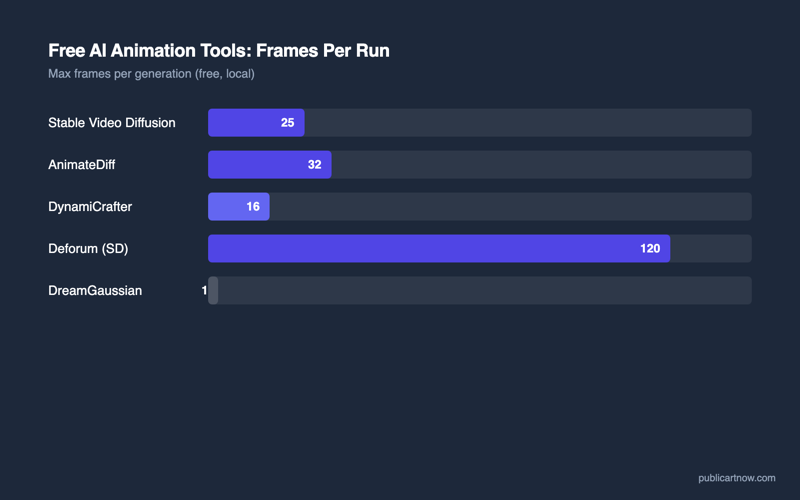
| Tool | Max length (free) | Quality | Runs locally | Min VRAM | Best for |
|---|---|---|---|---|---|
| AnimateDiff (ComfyUI) | Unlimited (loop) | Good — stylised | Yes | 8 GB | Creative loops, effects, stylised motion |
| Stable Video Diffusion (SVD) | 25 frames (~2-4 sec) | Excellent — photorealistic | Yes | 12 GB | Camera moves, subtle natural motion |
| DynamiCrafter | 32 frames (~4 sec) | Very good | Yes | 10 GB | Longer sequences, complex motion |
| Pika (free tier) | 3 seconds | Good | No (cloud) | None | Quick tests, no hardware required |
| Kling (free tier) | 5 seconds | Very good | No (cloud) | None | Higher quality cloud option |
AnimateDiff inside ComfyUI offers the most creative control for short loops, but Stable Video Diffusion produces more natural motion for camera moves and subtle environmental animation. The choice depends on whether the output needs to look photorealistic or whether stylised, dreamlike motion is acceptable.
How does AnimateDiff work inside ComfyUI?
AnimateDiff injects temporal attention layers into a standard Stable Diffusion model, teaching it to generate coherent frame sequences rather than independent images. Inside ComfyUI, the workflow involves loading a motion module alongside the base checkpoint, setting a frame count and motion scale, and optionally applying ControlNet conditioning per frame for guided motion.
The practical setup requires downloading the AnimateDiff motion module (approximately 1.8 GB per model version), installing the ComfyUI-AnimateDiff-Evolved custom node pack, and connecting the motion model loader to the standard generation pipeline. Frame counts of 16-32 are typical for loops; longer sequences require sliding-window generation.
AnimateDiff’s particular strength is creative control. ControlNet conditioning can be applied per-frame, meaning a series of pose skeletons can drive a dancing figure, or a sequence of depth maps from a 3D camera path can produce an architectural walkthrough. This level of per-frame control is unavailable in any cloud-based free tier tool as of August 2026.
How does Stable Video Diffusion compare?
Stable Video Diffusion (SVD), released by Stability AI in November 2023, takes a different approach. Rather than modifying an image model with temporal attention, SVD was trained from scratch as a video foundation model. It accepts a single conditioning frame and generates 14 or 25 subsequent frames of natural motion — camera pans, zooms, or environmental movement like flowing water and swaying trees.
SVD excels at photorealistic output. According to Stability AI’s release documentation, the model was trained on a curated dataset of high-quality video clips specifically selected for motion quality and visual coherence. The result is output that looks like genuine camera footage rather than AI-interpolated frames.
The trade-off is limited control. SVD accepts a conditioning image and an optional motion bucket parameter (how much motion to apply), but offers no frame-by-frame guidance. The motion direction and subject movement are inferred by the model. For a free AI video generator that needs to produce a specific action, AnimateDiff with ControlNet is more appropriate; for an atmospheric, camera-move-style animation from a landscape photo, SVD is superior.
What hardware do you need to run these locally?
Video generation demands significantly more VRAM and computation than still images. A single Stable Diffusion image at 512×512 requires approximately 4 GB of VRAM. Generating 25 frames of video at the same resolution requires holding temporal state across all frames simultaneously — multiplying memory requirements.
Practical minimums for usable output at reasonable speeds:
- AnimateDiff (16 frames, 512×512): RTX 3060 12 GB or RTX 4060 Ti 16 GB. Generation takes 2-4 minutes.
- SVD (25 frames, 576×1024): RTX 4070 12 GB minimum. RTX 4080 16 GB recommended. Generation takes 3-8 minutes.
- DynamiCrafter (32 frames, 512×512): RTX 3080 10 GB minimum. Generation takes 5-10 minutes.
For users without capable hardware, Pika and Kling offer free cloud tiers with daily generation limits. Pika provides approximately 10 free generations per day with a 3-second maximum. Kling offers 5 free generations daily but at higher quality and up to 5 seconds. Neither approaches the control or unlimited volume of local generation.
What are the current limitations of free AI video?
The technology is advancing rapidly but retains significant constraints. Maximum length remains short — even with sliding-window generation, maintaining temporal coherence beyond 4-6 seconds is difficult without visible flickering or morphing. Subject consistency degrades with motion complexity: a face turning 90 degrees will likely distort. Physics remain approximate — fabric, fluid, and rigid-body interactions are plausible rather than accurate.
Resolution is capped by VRAM. Most local workflows produce 512×768 or 576×1024 output. Upscaling via Topaz Video AI or Real-ESRGAN adds resolution after generation but cannot add detail that was never generated. According to research published on arXiv regarding SVD’s architecture, future models will likely solve the length problem through autoregressive video generation conditioned on previous segments.
For related reading, see how ControlNet changed AI images and how real-time AI rendering works.
Can these tools produce 30-second or longer videos?
Not reliably from a single generation pass. Producing longer videos requires chaining multiple short segments using the last frame as the conditioning input for the next segment. Results degrade with each chain link — expect visible drift after 3-4 segments (12-16 seconds total).
Do any free tools handle text or logos in video?
AI video models struggle with text stability across frames. Letters morph and flicker. For logo animations, traditional motion graphics tools (DaVinci Resolve, Blender) remain far more reliable. AI video is best suited to environmental and organic motion, not graphic design animation.
Is the output quality good enough for professional use?
For concept visualisation, social media content, and mood videos — yes. For broadcast, product advertising, or anything requiring frame-perfect consistency — not yet. The technology serves ideation and low-stakes publishing well.
Can you control the direction of motion?
AnimateDiff with ControlNet offers full directional control via per-frame conditioning. SVD offers only a motion magnitude parameter. DynamiCrafter accepts start and end frame conditioning for guided interpolation. Cloud tools like Pika allow text-based motion prompts (“zoom in”, “pan left”).
Sources
- Guo, Y. et al. — AnimateDiff: Animate Your Personalized Text-to-Image Diffusion Models (2023)
- Stability AI — Stable Video Diffusion release announcement
- ComfyUI-AnimateDiff-Evolved — GitHub repository
- DynamiCrafter: Animating Open-domain Images with Video Diffusion Priors
- ComfyUI — Official repository and workflow examples