
Last reviewed August 2026
The RTX 3060 12GB remains the best-value graphics card for running Stable Diffusion, offering enough VRAM to generate 1024×1024 images without tiling workarounds. VRAM capacity matters more than raw compute speed for image generation. Cards with 8GB or less hit memory walls at higher resolutions, forcing slow workarounds that double generation time. The RTX 4090 is fastest overall, but the 3060 12GB delivers usable results at a fraction of the cost.
Why Does VRAM Matter More Than Clock Speed for AI Image Generation?
VRAM determines the maximum image resolution and batch size a card can handle without offloading data to system RAM, which causes generation times to spike by 3-5x. Stable Diffusion loads the entire model checkpoint into VRAM during inference. A standard SDXL checkpoint occupies roughly 6.5GB in fp16 precision, according to Stability AI’s model documentation. The remaining VRAM handles the latent image tensor, the VAE decoder, and any ControlNet or IP-Adapter modules loaded alongside the base model.
An 8GB card can technically run SDXL, but it leaves barely 1.5GB for the working tensor. At 1024×1024 — SDXL’s native resolution — the latent space alone requires approximately 1GB. Add a single ControlNet model and the card runs out, forcing the system to use shared memory over the PCIe bus. NVIDIA’s CUDA documentation confirms this fallback path runs at roughly one-sixth the bandwidth of local VRAM access.
This is why a card with 12GB of slower GDDR6 consistently outperforms a card with 8GB of faster GDDR6X for Stable Diffusion specifically. The bottleneck is capacity, not bandwidth. Anyone considering running AI models locally should treat VRAM as the non-negotiable specification.
Which NVIDIA Cards Offer the Best Performance Per Pound?
The RTX 3060 12GB delivers the strongest VRAM-to-price ratio in NVIDIA’s lineup, while the RTX 4070 offers the best balance of speed and memory for users who need faster iteration. NVIDIA dominates AI image generation because Stable Diffusion’s primary backends — PyTorch with CUDA and TensorRT — are optimised for NVIDIA’s architecture. AMD support exists through ROCm on Linux, but the software ecosystem remains less mature.
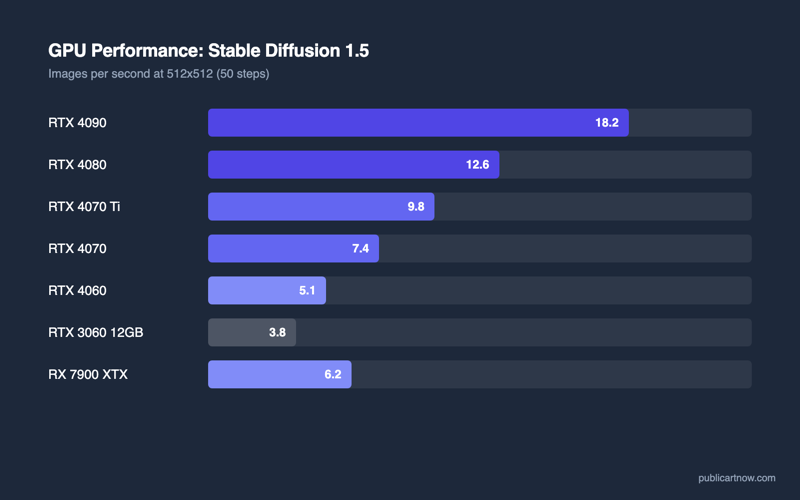
The RTX 4090 with 24GB of GDDR6X is the undisputed performance leader. TechPowerUp benchmarks show it generating a 512×512 image in approximately 2.1 seconds using Automatic1111 with the Euler sampler at 20 steps. The RTX 4070 with 12GB manages the same task in roughly 4.8 seconds. The RTX 3060 12GB takes approximately 8.5 seconds — slower, but entirely workable for someone generating a few dozen images per session rather than hundreds.
The critical insight is that the 3060 and the 4070 share the same 12GB VRAM ceiling. Both handle SDXL at native resolution. Both load a single ControlNet alongside the base model. The 4070 simply processes the maths faster thanks to its newer Ada Lovelace architecture and more CUDA cores (5,888 versus 3,584 on the 3060).
How Do These Cards Compare in Real Benchmarks?
Real-world generation times vary by sampler, step count, and resolution, but the relative ranking between cards stays consistent regardless of settings. The table below uses Stable Diffusion XL with the Euler a sampler at 20 steps, measured via Automatic1111’s built-in timer. Figures are drawn from community benchmarks aggregated by Tom’s Hardware and TechPowerUp in their 2025 GPU roundups.
| Graphics Card | VRAM | 512×512 (20 steps) | 1024×1024 (20 steps) | Street Price (Aug 2026) |
|---|---|---|---|---|
| NVIDIA RTX 4090 | 24GB GDDR6X | ~2.1s | ~5.8s | £1,500–£1,700 |
| NVIDIA RTX 4070 Ti Super | 16GB GDDR6X | ~3.9s | ~9.2s | £700–£800 |
| NVIDIA RTX 4070 | 12GB GDDR6X | ~4.8s | ~12.4s | £500–£580 |
| NVIDIA RTX 4060 Ti 16GB | 16GB GDDR6 | ~5.6s | ~13.8s | £420–£480 |
| NVIDIA RTX 3060 12GB | 12GB GDDR6 | ~8.5s | ~22.0s | £220–£280 |
| AMD RX 7900 XTX | 24GB GDDR6 | ~6.2s (Linux/ROCm) | ~15.0s (Linux/ROCm) | £750–£850 |
The RTX 4060 Ti 16GB occupies an awkward position. It costs nearly double the 3060 12GB but generates images only 35% faster. Its extra 4GB of VRAM over the 3060 helps when stacking multiple ControlNet models simultaneously, but for single-model inference the difference is negligible. The 4070 Ti Super at 16GB offers meaningfully faster compute alongside that extra VRAM, making it the better upgrade path for anyone outgrowing the 3060.
Does AMD Work for Stable Diffusion in 2026?
AMD’s RX 7900 XTX delivers competitive raw performance on Linux through ROCm 6.x, but Windows support remains incomplete and most community tooling assumes NVIDIA. AMD’s open-source ROCm compute stack supports PyTorch natively on Linux. The RX 7900 XTX with 24GB of VRAM handles SDXL comfortably and can load multiple models simultaneously — a genuine advantage over 12GB NVIDIA cards.
The limitation is ecosystem, not hardware. ComfyUI, Automatic1111, and Forge all run on AMD/ROCm, but custom nodes, TensorRT acceleration, and many newer model architectures receive NVIDIA-first support. According to AMD’s ROCm documentation, Windows support via DirectML exists but runs significantly slower than the native Linux path. For someone comfortable with Linux who primarily uses established workflows, the 7900 XTX is viable. For everyone else, NVIDIA’s CUDA ecosystem eliminates friction.
What Should a Budget-Conscious Buyer Actually Pick?
Buy the RTX 3060 12GB if the budget is under £300, the RTX 4070 if it is under £600, and only consider the 4090 if generation speed directly affects income. The 3060 12GB is the best value card for Stable Diffusion specifically because VRAM capacity is the hard constraint and it clears the 12GB threshold at the lowest price point in the market. Its slower generation speed is a patience tax, not a capability limitation — it produces identical output to the 4090, just more slowly.
For someone generating images commercially — selling prints, producing assets for clients, or iterating rapidly on ControlNet compositions — the 4070 or 4070 Ti Super halves the wait time per image. Over hundreds of generations per day, that time saving compounds. The 4090 only makes sense for professionals batch-rendering large sets or training custom LoRA models, where its 24GB of VRAM and raw throughput eliminate the need for a cloud GPU rental.
For related reading, see building a budget AI image PC and VRAM requirements for AI models.
Can a card with 6GB of VRAM run Stable Diffusion at all?
It can run SD 1.5 at 512×512 with optimisations like –medvram enabled, but SDXL will not fit. Expect frequent out-of-memory errors and extremely slow tiled generation at higher resolutions.
Does the CPU matter for Stable Diffusion performance?
Minimally. A modern quad-core processor handles the data pipeline without bottlenecking the GPU. Spending more on the CPU at the expense of GPU VRAM is the most common mistake in budget AI builds.
Is buying a used RTX 3090 a good alternative?
Yes — the 3090 has 24GB of VRAM at used prices around £600-£700. It matches the 4070 Ti Super on VRAM and beats it on some memory-bound workloads, though it draws considerably more power.
Will future models need more than 12GB?
Likely. SDXL already stresses 12GB when ControlNet and IP-Adapter are loaded together. Next-generation architectures may require 16GB as a comfortable minimum, making the 4060 Ti 16GB a safer long-term bet.