Last reviewed August 2026
A fully functional AI image generation PC can be built for approximately £580 using current component prices, with the RTX 3060 12GB as the centrepiece. The GPU accounts for nearly half the total budget because VRAM capacity — not CPU speed, not system RAM — is the binding constraint for Stable Diffusion and ComfyUI workloads. Two builds are presented below: a minimum viable rig at £580 and a more comfortable setup at £870 that adds headroom for larger models and faster iteration.
Why Does the GPU Deserve Most of the Budget?
Stable Diffusion performs all its computation on the GPU’s VRAM and shader cores, making the graphics card the only component that directly determines generation speed and maximum resolution. The CPU’s role is limited to loading model files from disk, running the web interface, and shuttling data to the GPU. According to NVIDIA’s developer documentation, inference on a diffusion model touches system RAM only during initial model loading — once the checkpoint is in VRAM, the CPU idles.
This means a budget quad-core processor like the Intel Core i3-12100F performs identically to a £400 Core i7 during actual image generation. The same applies to system RAM beyond 16GB: Stable Diffusion’s RAM footprint during inference rarely exceeds 8GB. Allocating budget away from the CPU and toward a better GPU is not a compromise — it is the correct engineering decision for this specific workload.
Anyone already familiar with free AI image tools running in the cloud will find that even the budget build below generates images faster than most free-tier cloud services, without queue times or daily limits.
What Does the Minimum Viable Build Look Like?
The £580 build pairs an Intel Core i3-12100F with an RTX 3060 12GB, 16GB of DDR4 RAM, and a 500GB NVMe SSD — enough to run SDXL, ComfyUI, and a single ControlNet model simultaneously. Every component was chosen for the minimum specification that avoids bottlenecking the GPU. Prices reflect UK retail averages as of August 2026.
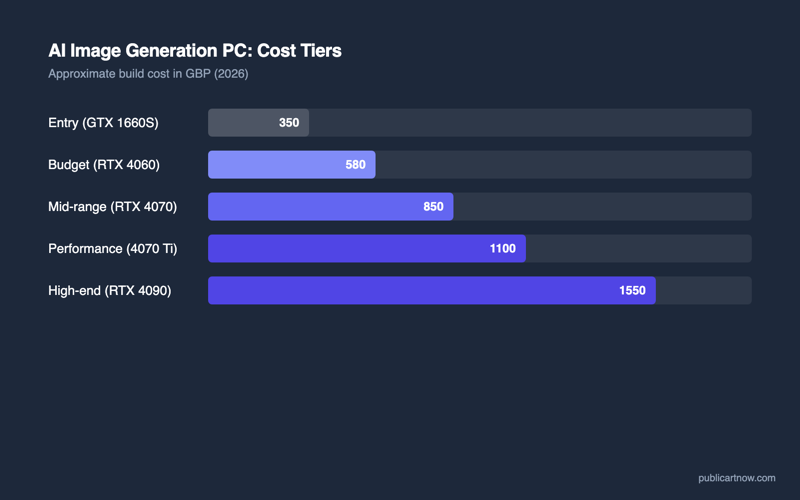
| Component | Minimum Build (£580) | Comfortable Build (£870) |
|---|---|---|
| CPU | Intel Core i3-12100F — £80 | AMD Ryzen 5 5600 — £110 |
| Motherboard | B660M mATX (MSI PRO B660M-A) — £75 | B550M mATX (MSI PRO B550M-A) — £80 |
| GPU | RTX 3060 12GB (used/refurbished) — £220 | RTX 4070 12GB — £520 |
| RAM | 16GB DDR4-3200 (2×8GB) — £35 | 32GB DDR4-3200 (2×16GB) — £55 |
| Storage | 500GB NVMe SSD (WD SN570) — £35 | 1TB NVMe SSD (WD SN770) — £55 |
| PSU | 550W 80+ Bronze (Corsair CV550) — £45 | 650W 80+ Gold (Corsair RM650) — £70 |
| Case | mATX budget (Tecware Forge M) — £40 | mATX mid (Fractal Pop Mini) — £55 |
| Total | ~£580 (GPU used) | ~£870 (GPU new) |
The minimum build uses a used or refurbished RTX 3060 12GB. The secondary market for these cards is mature — eBay and CEX consistently stock them between £200 and £260 with warranty. A new RTX 3060 12GB retails around £280 if used hardware feels risky.
What Makes the Comfortable Build Worth the Extra Cost?
The RTX 4070 in the comfortable build generates images roughly 45% faster than the RTX 3060 12GB while consuming less power, making it the right upgrade for anyone planning to generate more than a handful of images per session. The Ada Lovelace architecture also brings hardware-accelerated TensorRT support, which ComfyUI can leverage for an additional 30-40% speed improvement on supported models.
The 32GB of system RAM in the comfortable build matters less for Stable Diffusion itself and more for multitasking. Running ComfyUI alongside a browser with reference images, a text editor with prompts, and occasionally Blender or GIMP for post-processing pushes past 16GB quickly. The 1TB SSD accommodates more model checkpoints — a typical collection of base models, LoRAs, and ControlNet weights easily reaches 80-120GB.
Spending the extra on a 12GB GPU rather than a faster CPU is the single decision that separates a usable AI rig from a frustrating one. The comfortable build makes that same trade-off at a higher price point: the Ryzen 5 5600 is still a mid-range chip, but the 4070 is a genuinely fast AI accelerator.
Which Components Can Safely Be Downgraded Further?
The case, the PSU efficiency rating, and the SSD brand are the three areas where cutting costs introduces no performance penalty for AI workloads. A £25 case with adequate airflow works identically to a £60 one. An 80+ Bronze PSU wastes slightly more electricity as heat but delivers the same stable power. A budget NVMe SSD loads model files a fraction of a second slower than a premium one — invisible in practice because loading happens once per session.
What cannot be safely downgraded: GPU VRAM below 12GB, system RAM below 16GB, or PSU wattage below the GPU’s recommended minimum. The RTX 3060 12GB draws up to 170W under load; the RTX 4070 draws up to 200W. A 550W PSU handles either with comfortable headroom for the rest of the system, but a 450W unit risks instability under sustained generation.
Is It Cheaper to Just Use Cloud GPU Services Instead?
Cloud GPU rental costs £0.30-£0.80 per hour for comparable hardware, which means the minimum build pays for itself within 800-1,900 hours of use — roughly 3-6 months of daily generation. Services like RunPod and Vast.ai offer RTX 3090 instances at approximately £0.40/hour. At two hours of generation per day, that is £24/month or £288/year — half the cost of the minimum build annually, but with no ownership and no offline access.
The local build wins on three fronts: zero queue times during peak demand, no internet dependency, and no recurring cost after the initial purchase. For someone experimenting casually once a week, cloud services remain cheaper. For anyone generating images daily, the hardware investment breaks even within months and then generates for free indefinitely.
For related reading, see which GPUs handle Stable Diffusion and running multiple AI tools without conflicts.
Can this build run models other than Stable Diffusion?
Yes. The 12GB VRAM handles FLUX.1-schnell, most ControlNet architectures, and smaller language models like Llama 3.1 8B quantised. Larger LLMs require more VRAM than 12GB provides.
Should the build use Intel or AMD for the CPU?
Either works identically for AI inference. The choice is purely about platform cost — whichever CPU plus motherboard combination is cheaper at purchase time. Neither brand offers a meaningful advantage here.
Is 16GB of system RAM really enough?
For dedicated AI generation with minimal multitasking, yes. If the machine also serves as a general workstation running multiple applications alongside ComfyUI, upgrade to 32GB at build time — adding RAM later means finding matching sticks.
Does the build need active cooling beyond what ships with the components?
The stock CPU cooler bundled with both the i3-12100F and Ryzen 5 5600 is adequate. The GPU has its own cooler. No aftermarket cooling is required unless ambient room temperature exceeds 30°C regularly.