
An SSD left unplugged loses data. The industry standard it is built to requires a consumer drive to hold its contents for one year at 30°C once powered off, and an enterprise drive for just three months at 40°C. Those are minimum guarantees at end of life, not expiry dates, but they are the only numbers anyone has committed to.
How long does an SSD keep data without power?
One year for a consumer drive, under the conditions the standard specifies. JEDEC’s JESD218 requires a client-class SSD used actively at 40°C for eight hours a day to retain data for one year at 30°C after power-off. Enterprise drives, run at 55°C around the clock, must manage three months at 40°C.
The enterprise figure looks wrong until the trade-off is clear. Those drives are specified for constant heavy writing, and endurance under load is bought at the cost of retention when idle.
IBM states the position plainly in its own support guidance, noting that “the JEDEC spec for Enterprise SSD drives requires that the drives retain data for a minimum of 3 months at 40C”, and advising that a powered-off system “should be powered up at least 2 weeks after 2 months of system power off”.
Why does a powered-off SSD lose anything at all?
Because a flash cell stores a bit as trapped electric charge behind an insulating layer, and that charge leaks. The insulator is imperfect, so over time the voltage in each cell drifts towards its neighbours’ levels, and the controller can no longer tell which value was written.
Nothing about this requires the drive to be faulty. It is the ordinary physics of the storage mechanism, and a hard disk does not share it because magnetic domains do not leak in the same way.
A powered drive repairs itself. Its controller runs background scans, spots cells drifting towards error, and rewrites the affected blocks before the data is lost. Unplugging the drive removes that maintenance, which is the actual reason retention becomes a question.
The drive in a drawer is not resting. It is the only state in which an SSD has no way to repair itself.
How much does the flash type matter?
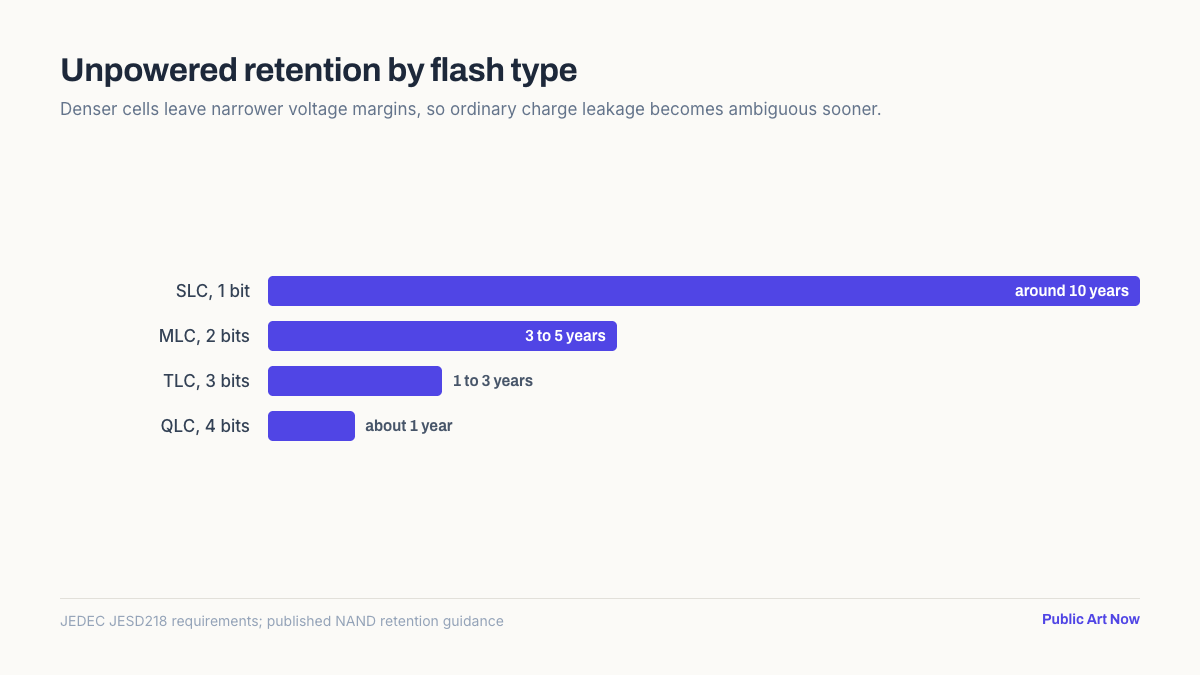
Considerably, and it is the specification consumers are least often told. The more bits packed into each cell, the narrower the voltage bands separating them, and the sooner ordinary charge leakage becomes ambiguous. Density and retention trade directly against one another.
| Flash type | Bits per cell | Typical unpowered retention |
|---|---|---|
| SLC | 1 | Around 10 years |
| MLC | 2 | 3 to 5 years |
| TLC | 3 | 1 to 3 years |
| QLC | 4 | About 1 year |
Manufacturers rarely put the flash type on the box, but it is usually listed in the product datasheet or in independent drive round-ups. Nearly every consumer SSD sold today is TLC or QLC. The cheap high-capacity drives that make good archive candidates on price are, by that same logic, the worst ones to leave unplugged for years.
Does temperature really change the answer?
Substantially, and in both directions. Charge leakage is a thermally driven process that follows an Arrhenius relationship with temperature, so retention roughly halves for every 5°C increase in storage temperature. The standard’s numbers are quoted at 30°C for a reason.
This is why a drive in a loft, a garage or a car boot is in a different category from one in a cupboard. A summer loft can sit well above 40°C for weeks, which can cut a one-year guarantee to a matter of months.
IBM’s guidance makes the same point about powered-down systems, advising that environmental control “should still be in place to ensure systems are experiencing less than 40C at all times, even if the systems are powered down”.
What should be used for long-term storage instead?
Anything that is checked rather than trusted. The failure mode of unpowered flash is silent, since files remain listed and then open partially or not at all, so the property that matters in an archive is not the medium’s lifespan but whether errors are detected while a second copy still exists.
- Keep three copies. The 3-2-1 rule, meaning three copies on two media types with one offsite, exists precisely because every medium fails differently.
- Power archive drives periodically. Connecting a drive for a few hours every six months lets the controller run its scans.
- Verify with checksums. Silent corruption is invisible without them; a filesystem such as ZFS checks on every read.
- Prefer spinning disks for cold storage. A hard disk sitting unpowered has no charge to lose, whatever its other weaknesses.
Cloud storage sidesteps the question entirely, because the provider’s own drives are powered and continuously verified. That is a genuine engineering advantage rather than a marketing one, and it is the strongest argument for the offsite copy.
Is the drive in daily use at risk?
No. Retention only becomes a concern when a drive spends long periods disconnected. A laptop or desktop SSD used weekly is scanned and refreshed by its own controller, and the retention specification never comes into play at all. The background process responsible runs whenever the drive is idle but powered, which is most of the time on an ordinary machine.
The drives at risk are the ones nobody thinks about: a laptop replaced two years ago and put in a cupboard, an external drive holding a wedding shoot, a spare pulled during an upgrade. Old machines kept as a fallback are a common case, and reviving an old laptop is a good moment to check what is still readable on it.
A drive returned to service after years unpowered should be read once in full before being trusted. If files open and checksums match, the data survived. It is the same discipline that keeps a working local notes archive readable a decade later, where the files are small and the loss would be total.
The bottom line
An unplugged SSD is guaranteed to hold consumer data for one year at 30°C, and no longer. Real drives usually exceed that comfortably, but the margin shrinks with heat, with write wear, and with the denser TLC and QLC flash in almost everything sold today.
Flash is a working medium, not an archival one. For anything that has to survive a decade, keep multiple copies, verify them, and power the drives occasionally rather than assuming the files are simply sitting there.
Frequently asked questions
How long does an SSD hold data without power?
The JEDEC standard requires one year at 30°C for consumer drives and three months at 40°C for enterprise drives, measured at the end of rated write endurance. Healthy drives generally do better, but nothing longer is guaranteed.
Do SSDs lose data faster than hard drives when unplugged?
Yes, for cold storage. Flash cells hold data as trapped charge that leaks over time, while a hard disk stores it magnetically with no equivalent decay. Hard disks fail in other ways, but not from sitting unpowered.
How often should an archive SSD be plugged in?
Every six months is a reasonable habit, and IBM advises powering enterprise systems for two weeks after two months off. Connecting the drive lets its controller scan for drifting cells and rewrite them before data is lost.
Does heat shorten SSD data retention?
Sharply. Charge leakage is thermally driven, so retention roughly halves for every 5°C rise in storage temperature. A drive stored in a loft or a car can lose its rated retention window several times over in a single summer.
Is QLC flash worse for archiving?
Yes. Packing four bits into each cell leaves very narrow voltage margins, so ordinary leakage becomes ambiguous sooner. QLC drives typically hold unpowered data for around a year, against three to five years for older MLC flash.