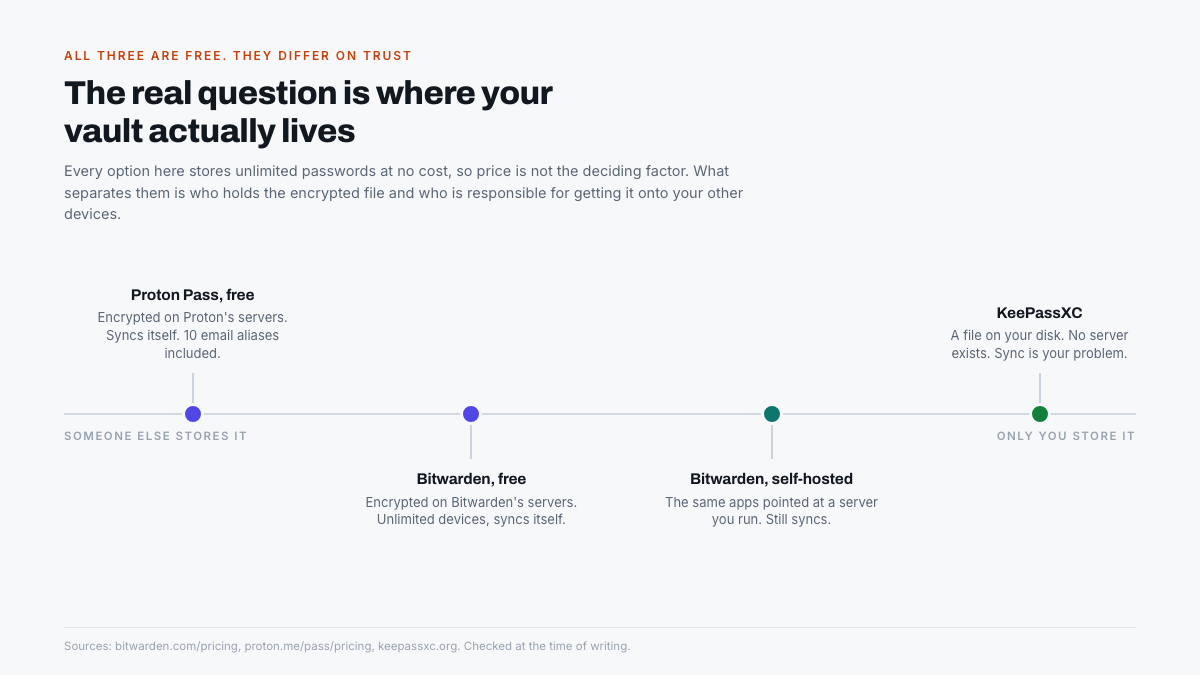
Password managers are the rare software category where the free versions are genuinely complete. Bitwarden, Proton Pass and KeePassXC all store unlimited passwords across unlimited devices without payment, so cost is not the deciding factor and any article ranking them by price is answering the wrong question. The real difference is who holds the encrypted vault, and what each one quietly reserves for its paid tier.
Are free password managers actually safe?
Yes, and in this category the free version is usually the same software as the paid one. All three use zero-knowledge encryption, meaning the vault is encrypted and decrypted on your device and the provider never holds the key. Paying adds convenience features, not stronger encryption.
Proton states the position directly on its own pricing page: its free and paid plans offer the same level of privacy protection. That is the norm here rather than the exception, and it is why the free tiers are worth taking seriously instead of treating as trials.
A password manager you actually use beats a better one you abandon after a week. Convenience is a security feature, not a luxury.
What each one gives you for nothing
Bitwarden, the safe default
Bitwarden’s free plan covers unlimited devices and unlimited passwords, and it is a fully functional manager rather than a cut-down one. It stores notes, credit cards and identities, manages passkeys, generates usernames and passwords, and permits free sharing with one other person. Bitwarden Send handles encrypted one-off sharing of text or files.
Premium costs $1.65 a month billed annually, which works out at $19.80 a year, and adds an integrated authenticator, 5GB of encrypted file attachments, emergency access, and vault health reports. Of those, emergency access is the one most people eventually want, because it is how somebody you nominate reaches your vault if you cannot.
Proton Pass, the one with email aliases
Proton Pass matches Bitwarden on the basics: its free tier covers unlimited logins, notes and credit cards across unlimited devices, with no credit card required and passkeys supported on all devices. What sets it apart is 10 hide-my-email aliases included free.
Aliases are underrated. A hide-my-email address forwards to your real inbox while concealing it, so a service that leaks or sells your address exposes a disposable one you can switch off. Ten is enough for the accounts that matter most. The paid tier lifts that to unlimited and adds an integrated 2FA authenticator, dark web monitoring and secure vault sharing.
KeePassXC, no server at all
KeePassXC is a different proposition. There is no company account and no cloud: the vault is an encrypted file on your disk, and the application is released under the GPLv3. Its own site describes the approach as no-nonsense, ad-free, tracker-free and cloud-free, which is an accurate summary of both the appeal and the cost.
It carries a credential the hosted options do not. KeePassXC has been awarded a Security Visa by the French national cybersecurity agency, which is a state-level review rather than a marketing badge. For anyone whose objection to password managers is that a breach at the provider exposes everyone at once, KeePassXC removes the provider from the threat model entirely.
The trade-off is real and lands on you. Nothing syncs by itself. Getting the vault onto a phone means putting the file somewhere both devices can reach, which usually means a cloud storage service, at which point you have reintroduced a third party by another route.
Quick comparison
| Bitwarden free | Proton Pass free | KeePassXC | |
|---|---|---|---|
| Passwords and devices | Unlimited, unlimited | Unlimited, unlimited | Unlimited, unlimited |
| Sync | Automatic | Automatic | You arrange it |
| Passkeys | Yes | Yes, all devices | Yes |
| Built-in 2FA codes | Premium only | Paid only | Yes, free |
| Email aliases | No | 10 free | No |
| Licence | Open source | Open source apps | GPLv3, fully open |
One row in that table is worth a second look. KeePassXC gives you two-factor codes free, while both hosted services reserve their integrated authenticator for paying customers. Storing 2FA codes beside the passwords they protect is a debated practice, but if you want it at no cost, the offline option is the one that provides it.
Which should you choose?
Match the tool to how much responsibility you want. There is no wrong answer among the three, only a mismatch between the tool and the person using it.
- Bitwarden if you want one recommendation and no further thought. It syncs, it works on everything, it is open source, and the free tier is complete enough that most people never upgrade.
- Proton Pass if you are already in Proton’s ecosystem, or if email aliases appeal. Ten free aliases genuinely reduce how much spam and tracking reaches your real address.
- KeePassXC if you object on principle to a company holding your vault, or if the machine is offline anyway. It is the strongest choice technically and the most demanding practically.
The part that actually protects you
Whichever one you pick, three habits matter more than the choice between them. They are unglamorous and they are where most real-world failures happen.
- The master password must be long, not clever. A passphrase of four or five unrelated words beats a short password with symbol substitutions, and you have to remember it, because nobody can reset it for you.
- Store the recovery information offline. Print the recovery code or emergency kit and put it somewhere physical. A vault you cannot open is the same as a vault you have lost.
- Change the passwords that were already reused. Importing everything and stopping there leaves the original problem untouched. Work through the flagged duplicates a few at a time, starting with email and banking.
The bottom line
Bitwarden’s free plan is the right default for nearly everyone, because unlimited passwords on unlimited devices with automatic sync removes every excuse not to start. Proton Pass is the better pick if the email aliases matter to you, and KeePassXC is the right answer for anyone who wants no provider in the picture at all.
The genuinely important decision is not which of the three. It is whether the master password is strong, whether the recovery kit exists on paper, and whether the reused passwords ever get replaced. Get those right and any of these three will do the job for free, indefinitely.
Frequently asked questions
Is Bitwarden really free forever?
Yes. The free personal plan covers unlimited passwords on unlimited devices, including passkey management and free sharing with one other person. Premium at $1.65 a month adds an integrated authenticator, file attachments, emergency access and vault health reports, none of which are required to use it properly.
What is the catch with free password managers?
Usually the integrated two-factor authenticator and account recovery features, which both Bitwarden and Proton reserve for paid tiers. Encryption and password storage are identical on free plans. The limits are on convenience, not on security.
Is KeePassXC better than Bitwarden?
It is more private and less convenient. KeePassXC keeps the vault as a file on your own disk under GPLv3 with no provider involved, and carries a Security Visa from the French national cybersecurity agency. It does not sync by itself, so getting the vault onto a phone is your responsibility.
What are hide-my-email aliases?
Forwarding addresses that hide your real inbox. Proton Pass includes 10 free. If a service leaks or sells the address, you switch off that alias rather than changing your actual email everywhere, which limits the damage from any single breach.
Can a password manager store two-factor codes?
All three can, but only KeePassXC offers it free. Bitwarden and Proton Pass both reserve their integrated authenticator for paid plans. Keeping 2FA codes in the same vault as the passwords is convenient but reduces the independence that made two factors useful.