
Free AI video is a far thinner promise than free AI images. A five-second clip costs a provider roughly what a hundred stills cost, so the free tiers are smaller, stricter, and much quicker to disappear. Three routes still work without payment in 2026: a genuine daily allowance, an off-peak queue, and open-weight models running on your own hardware. Everything else is a demo with a friendlier name.
What should count as free for video?
A free video tier only matters if it produces a clip somebody can actually use. That means three things at once: output without a watermark burned across the frame, a limit that refreshes rather than a balance that empties once, and a licence permitting at least basic commercial use. Most tiers advertised as free fail at least one of the three.
The same bar was applied to free AI image tools, and most of them cleared it comfortably. Video is where the bar starts breaking tools. Of the six routes below, only two clear all three conditions, and both of them require a graphics card rather than an account.
The refresh distinction is the one that catches people out. A tier offering a large number of credits sounds generous until the small print reveals it is a lifetime allocation. Once spent, the account is a paid account that has not been paid for yet.
Why free video tiers keep shrinking
Inference cost is the whole explanation. Text generation is cheap, image generation is manageable, and video generation is neither. Every free clip is a direct GPU bill paid by the vendor in the hope of converting the person who requested it, and video converts more slowly than the bill arrives. The result is a market where free tiers get quietly trimmed between funding rounds.
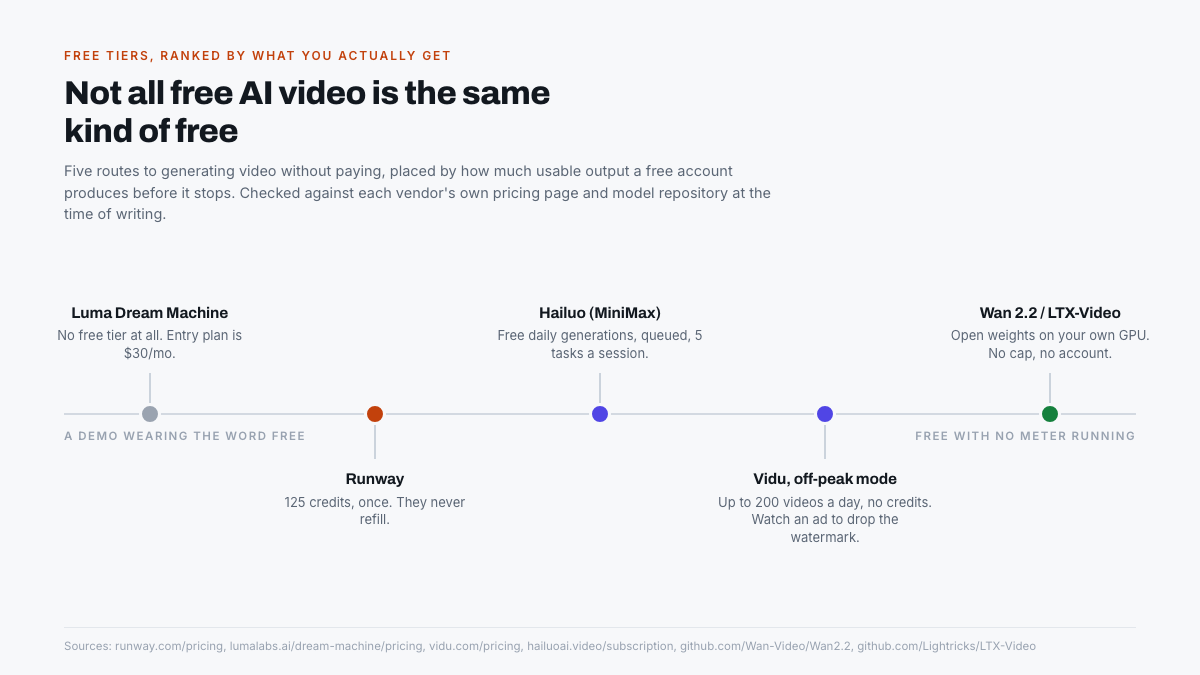
Luma is the clearest case. Dream Machine launched with a free tier that people used heavily, and today the pricing page lists no free option at all. The cheapest way in is the Plus plan at $30 a month, or $25 a month billed yearly, and commercial use begins at that same tier. A tool that was free eighteen months ago now starts at $300 a year.
A credit balance that never refills is not a free plan. It is a trial with the clock hidden.
This is why any list of free video tools dates faster than the equivalent list for images. The sensible response is to treat hosted free tiers as pleasant while they last, and to treat open-weight models as the part of the answer that cannot be withdrawn.
What each free tier actually gives you
Runway, the one-time balance
Runway remains the best-known name in the category and has the least useful free plan of the group. Its pricing page describes the free tier as 125 one-time credits alongside 5GB of asset storage, and its documentation is explicit that this is a one-time deposit of 125 credits that does not expire. The credits do not expire, but they also never come back.
That works out to a handful of generations. It is enough to judge whether the model suits a project and nothing beyond that. Treated as an extended demo it is fair; treated as a free plan it is misleading, because there is no second week of usage to look forward to.
Luma Dream Machine, the free tier that vanished
Included here as a warning rather than a recommendation. Dream Machine produces some of the most natural motion available, and none of it is reachable without a card on file. Plans run from $30 a month for 10,000 credits up to $300 a month at the Ultra tier. Anyone following an older guide that lists Luma among the free options is about to hit a paywall.
Hailuo by MiniMax, a real daily allowance
Hailuo runs the most conventional free model of the group: a daily bonus credit that refreshes, plus a stated four free generations a day on its Hailuo 2.3 model. New accounts additionally get three days of unlimited generation before dropping to the standard free allowance. That refresh is the important part, because it makes the tool usable in week four rather than only in hour one.
Two caveats sit in MiniMax’s own subscription page. Watermark-free download is listed as a paid-plan benefit across every tier, which is a polite way of saying free output carries a watermark. Against that, the company states plainly that there is no difference in the quality of the videos generated between plans. The free tier is throttled, not downgraded, which is a more honest arrangement than most.
Vidu, the most generous, if you can wait
Vidu takes the opposite approach to Runway. Its pricing page advertises an off-peak mode with unlimited free video creation that consumes no credits, and puts the ceiling at up to 200 video submissions a day. There is no other free tier in this category operating at that volume.
The trade-offs are timing and watermarking. Off-peak means the platform decides when the queue is quiet, so this suits batch work and overnight experiments rather than anything with a deadline attached. Removing the watermark on a free download requires watching a short advertisement, which is an unusual arrangement but a transparent one. For volume experimentation without a card on file, nothing else in the hosted category is close.
Wan 2.2, open weights on your own GPU
Alibaba’s Wan 2.2 is released under the Apache 2.0 licence, which settles the commercial-use question in one line rather than five paragraphs of terms. The practical variant for most people is TI2V-5B, which its repository states generates 720p video at 24 frames per second in five-second clips and needs at least 24GB of VRAM, a specification met by an RTX 4090.
The larger A14B models handle both 480p and 720p and are considerably better, but the same repository puts single-GPU inference for those at a minimum of 80GB of VRAM. That is data-centre hardware, not a desktop. The 5B model is the one that turns a gaming PC into an unmetered video generator.
LTX-Video, the fast one
Lightricks takes a different position on the quality-versus-speed trade. The LTX-Video repository gives a default output of 1216 by 704 pixels at 30 frames per second, supports clips up to 60 seconds, and ships under an OpenRail-M licence that permits commercial use. Its distilled 13B model generates an HD clip in around ten seconds on an H100, with a low-resolution preview after three.
The detail worth noticing is at the other end of the range. Lightricks documents a LoRA distilled variant requiring only 1GB of VRAM. Quality at that size is limited, but it puts local video generation on hardware that would not run any other model on this list.
Quick comparison
| Route | What the free tier gives you | Watermark | Commercial use |
|---|---|---|---|
| Runway | 125 credits, once, never refilled | None stated | Yes, within the credits |
| Luma Dream Machine | Nothing. Plans start at $30/mo | Not applicable | Plus plan and above |
| Hailuo (MiniMax) | Daily bonus credits, 4 free generations a day | Yes, removed on paid plans | Paid plans |
| Vidu, off-peak mode | Unlimited off-peak, up to 200 videos a day | Yes, removed by watching an ad | Check plan terms |
| Wan 2.2 (TI2V-5B) | Unlimited locally, needs 24GB VRAM | None | Yes, Apache 2.0 |
| LTX-Video | Unlimited locally, up to 60-second clips | None | Yes, OpenRail-M |
How to get more out of a free video tier
Free video allowances are small enough that technique matters more than it does with images. A wasted generation on a daily allowance of four is a quarter of the day gone. These habits stretch a thin allowance furthest.
- Start from an image, not a prompt. Image-to-video removes most of the uncertainty, because the composition is already settled before any credits are spent. Generate the still on a free image tool, then animate it.
- Describe the camera, not just the scene. Slow push in, locked-off wide shot, handheld pan left: these control the result far more reliably than adjectives about mood.
- Keep clips short and cut them together. Every model is more convincing at five seconds than at fifteen. Three short clips edited in sequence beat one long generation that drifts.
- Ask for one movement per clip. A subject moving while the camera moves while the light changes is where artefacts appear. Isolating a single motion raises the success rate sharply.
- Batch the slow tiers overnight. On an off-peak queue, the constraint is patience rather than volume. Queue a dozen variations before bed and pick from them in the morning.
When paying becomes the rational move
The honest case against free tiers is stronger for video than for images. Four generations a day is fine for curiosity and useless for a deadline. Anyone producing video on a schedule will burn more value in waiting and re-rolling than a subscription costs, and at that point paying is arithmetic rather than defeat.
The watermark question decides it faster than the volume question. A watermarked clip cannot go into client work, a product page, or an advertisement, so any commercial use forces either a paid plan or a local model. There is no third option, and no free hosted tier in this category currently offers clean commercial output.
The bottom line
For casual use, Vidu’s off-peak mode is the most generous hosted option available without payment, and Hailuo is the better choice when the work cannot wait for a quiet queue. Runway is worth 125 credits of evaluation and nothing more. Luma is no longer part of this conversation.
For anyone who intends to keep generating video past this year, the open-weight route is the only one that cannot be revoked in a pricing update. A 24GB card and Wan 2.2 removes every cap, every watermark, and every licence ambiguity in one step. That is a real cost in hardware, but it is paid once, to nobody’s subscription department.
Frequently asked questions
Which free AI video generator is best in 2026?
Vidu’s off-peak mode gives the most output for nothing, advertising unlimited free creation that consumes no credits and a ceiling of up to 200 video submissions a day. The cost is timing, because off-peak queues run when the platform is quiet rather than when it suits the user.
Is Runway free?
Only once. Runway’s free plan is a one-time deposit of 125 credits plus 5GB of storage, and its documentation confirms those credits do not refill. They do not expire either, but after a handful of generations the account stops producing anything without payment.
Do free AI video tools add a watermark?
The hosted ones do. MiniMax lists watermark-free download as a paid benefit on every Hailuo plan, and Vidu asks free users to watch a short advertisement before downloading a clean file. Open-weight models run locally apply no watermark at all.
Can free AI video be used commercially?
Safely, only from open-weight models. Wan 2.2 ships under Apache 2.0 and LTX-Video under OpenRail-M, both of which permit commercial use outright. Hosted free tiers either restrict commercial rights to paid plans or attach a watermark that rules the output out anyway.
What GPU do you need to generate AI video locally?
24GB of VRAM is the practical entry point. Wan 2.2’s TI2V-5B model states that requirement and runs on an RTX 4090, producing 720p clips at 24 frames per second. LTX-Video goes considerably lower, documenting a LoRA distilled variant that needs only 1GB.
Why did Luma remove its free tier?
Luma has not published a reason, but the economics are common to the category. Video inference costs far more per generation than image inference, so free tiers are expensive to sustain. Dream Machine now starts at $30 a month, with commercial use included from that plan upward.